Table of contents
Open Table of contents
- 1. Introduction: Why Note-Taking Matters in Cybersecurity
- 2. My Overall Note-Taking Philosophy
- 3. Tool #1 — OneNote: The Full Walkthrough Workspace
- 4. Tool #2 — Obsidian: My Central Knowledge Hub
- 6. Example Workflow: Start → Finish
- 7. The Documentation Checklist
- 8. Why This System Works
- 9. Final Thoughts
1. Introduction: Why Note-Taking Matters in Cybersecurity
#introduction
In cybersecurity, note-taking is not optional, it’s a core skill. Whether I’m working on a Hack The Box machine, tackling a Proving Grounds target, or researching a new vulnerability, the way I document my process directly affects how much I learn and how quickly I can improve.
Over time, I refined a workflow that blends OneNote, Obsidian, and mind maps, creating a system where deep technical walkthroughs become easier to understand, visually organized, and reusable at any time.
This blog explains exactly how I do it.
2. My Overall Note-Taking Philosophy
#note-taking-strategy
My note-taking strategy is built around three principles:
2.1 Capture Everything First
During a pentest or a lab session, I dump every command, idea, error message, and screenshot into a single place without worrying about organizing yet.
2.2 Synthesize Later
Once the machine is rooted, I analyze what I learned and convert the raw notes into reusable knowledge.
2.3 Build a System That Scales
Tools change, but methodology lasts. I document in a way that makes future me faster, not just present me comfortable.
3. Tool #1 — OneNote: The Full Walkthrough Workspace
#onenote-tool
OneNote is where the entire story of the machine lives.
3.1 Why OneNote?
-
Flexible drag-and-drop layout
-
Easy pasting of screenshots
-
Rich text formatting
-
Fast during active exploitation
-
Great for long, messy sessions
3.2 How I Structure My OneNote Pages
#onenote-structure
Each machine gets a single OneNote page with structure like:
[Machine Name - IP Address]
    ▸ Nmap
    ▸ Creds
    ▸ Methodology
    ▸ Web App name - Port
    ▸ Exploit
    ▸ Privilege Escalation
    ▸ Post Exploitation
    ▸ Beyond root
    ▸ Lessons Learned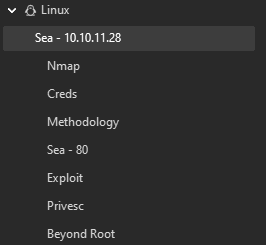
3.3 How I Record Data
#data-recording
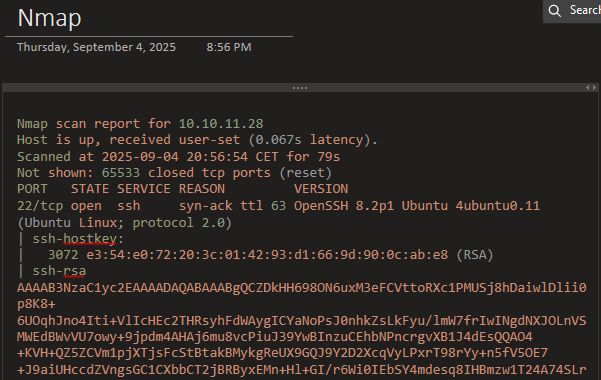
- Every command output (like nmap output)
- Full terminal logs
Terminals capture the output of nearly all commands and interactions with the target environment. To keep these logs organized, I use a simple script in my ~/.zshrc that automatically creates a logs directory in the current working folder and saves the full terminal session output using a timestamped filename.
# Create a log directory, a log file and start logging
if [ -z "${UNDER_SCRIPT}" ]; then
    logdir=./logs
    logfile="${logdir}/$(date +'%d-%m-%Y,%I:%M%p').$$.log"

    mkdir -p ${logdir}
    export UNDER_SCRIPT=${logfile}
    echo "The terminal output is saving to $logfile"
    script -f -q ${logfile}

    exit
fi- Screenshots of important steps
Obviously screenshots are what makes our final report, so capturing everything found is always essential.
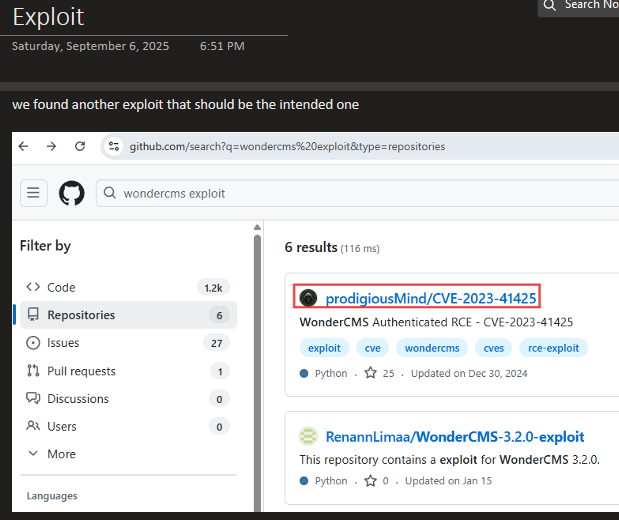
- Notes on dead ends or ideas
Sometimes an idea pops into our mind while we’re exploring something else. It’s worth writing it down before it slips away and we completely forget about it, and forget to try it.
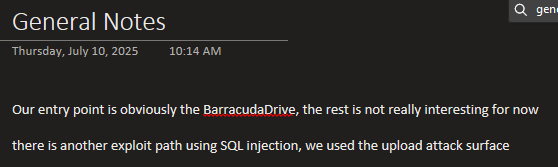
- Credentials, configs, or code snippets
I try to keep track of any creds discovered along with a short description of what the creds is used for?
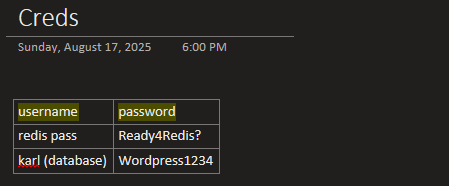
—> This becomes my raw memory archive.
4. Tool #2 — Obsidian: My Central Knowledge Hub
#obsidian-tool
After finishing a machine, I open Obsidian and extract the knowledge from the walkthrough I created in OneNote.
4.1 Why Obsidian?
-
Markdown-based (clean + portable)
-
Bidirectional linking
-
Graph view for relationships
-
Tags for quick lookup
-
Templates for consistency
-
Canvas for mindmaps and creative ideas
4.2 What Goes Into Obsidian
I don’t paste full walkthroughs here.
Instead, I extract only:
-
New commands
-
New techniques
-
Exploit patterns
-
Tool usage insights
-
Payloads
-
Mistakes to avoid next time
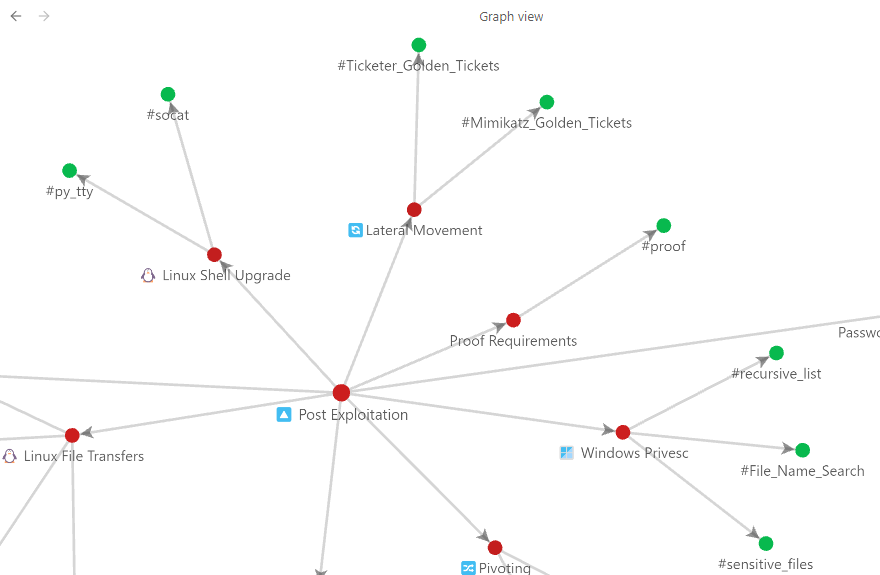
—> This turns every machine into permanent, reusable knowledge.
5. Tool #3 — Mind Maps: Visualizing the Machine Flow
#mindmaps
Mind maps help me understand the machine at a high level.
5.1 Why Mind Maps?
-
Reveal the attack path
-
Highlight enumeration → exploitation → privesc flow
-
Amazing for exam preparation
-
Help spot repeated vulnerability patterns
5.2 Example Mind Map Structure
A simple Mind Map structure within obsidian below
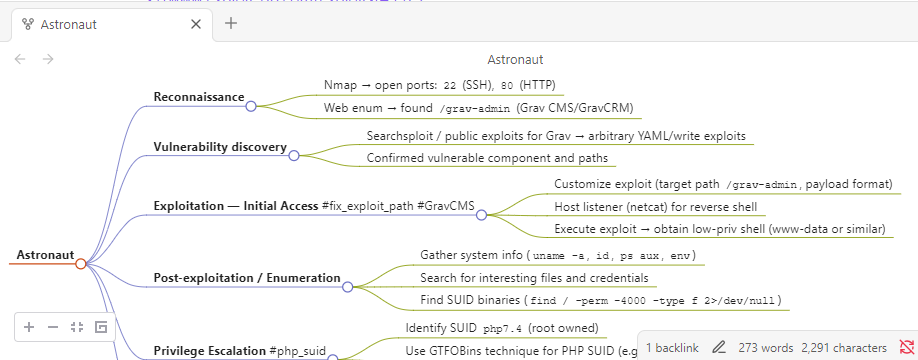
I use the obsidian plugin Mindmap NextGen to transform regular text bullet points to an easy to look at Mindmap.

5.3 When I Use Mind Maps
-
After solving a machine
-
Before making cheat sheets
-
Before certification exams
-
To review old machines quickly
6. Example Workflow: Start → Finish
#example-workflow
Here’s my full workflow from starting a machine to documenting everything.
6.1 Step 1 — Active Work: OneNote
-
Dump commands
-
Paste screenshots
-
Store configs / creds
-
Track trial & error
6.2 Step 2 — Knowledge Extraction: Obsidian
-
Create/update technique notes
-
Add commands to cheat sheets
-
Add tags
-
Link to similar vulnerabilities
6.3 Step 3 — Visual Summary: Mind Map
-
Draw the full attack chain
-
Highlight important jumps
-
Create a compact summary
6.4 Step 4 — Link Everything Together
In Obsidian:
-
Connect new notes
-
Update methodology templates
-
Add references to similar machines
7. The Documentation Checklist
#documentation-checklist
7.1 In OneNote
7.2 In Obsidian
7.3 In Mind Maps
8. Why This System Works
This workflow gives me:
-
Speed — OneNote is fast for messy sessions
-
Structure — Obsidian turns chaos into knowledge
-
Visual clarity — Mind maps reveal the big picture
-
Retention — Summaries lock in learning
-
Scalability — Easily reusable for future machines
-
Pattern recognition — Helps me see trends across challenges
It transforms random commands into long-term skills.
9. Final Thoughts
#final-thoughts
Cybersecurity rewards those who document well. The tools I use, OneNote, Obsidian, and mind maps, each serve a different purpose, and together they form a system that helps me understand more, retain more, and work smarter.
If you want to level up your methodology, start with your note-taking process. It’s one of the strongest long-term advantages you can build.